> ## Documentation Index
> Fetch the complete documentation index at: https://docs.scanova.io/llms.txt
> Use this file to discover all available pages before exploring further.
# What is Scanova?
> An overview of the Scanova platform: dynamic QR codes, a page builder, forms, and analytics.
## Overview
Scanova is a QR code platform for creating, managing, and tracking QR codes at scale. Every QR code you create is one of two kinds:
* A **Quick Code** — a direct-action QR code that does something the instant it's scanned (opens a URL, dials a number, joins a Wi-Fi network) with no landing page involved.
* A **Page** — a QR code that points to a landing page you build block-by-block (or generate with AI), for cases where scanning should show branded content rather than trigger an immediate action.
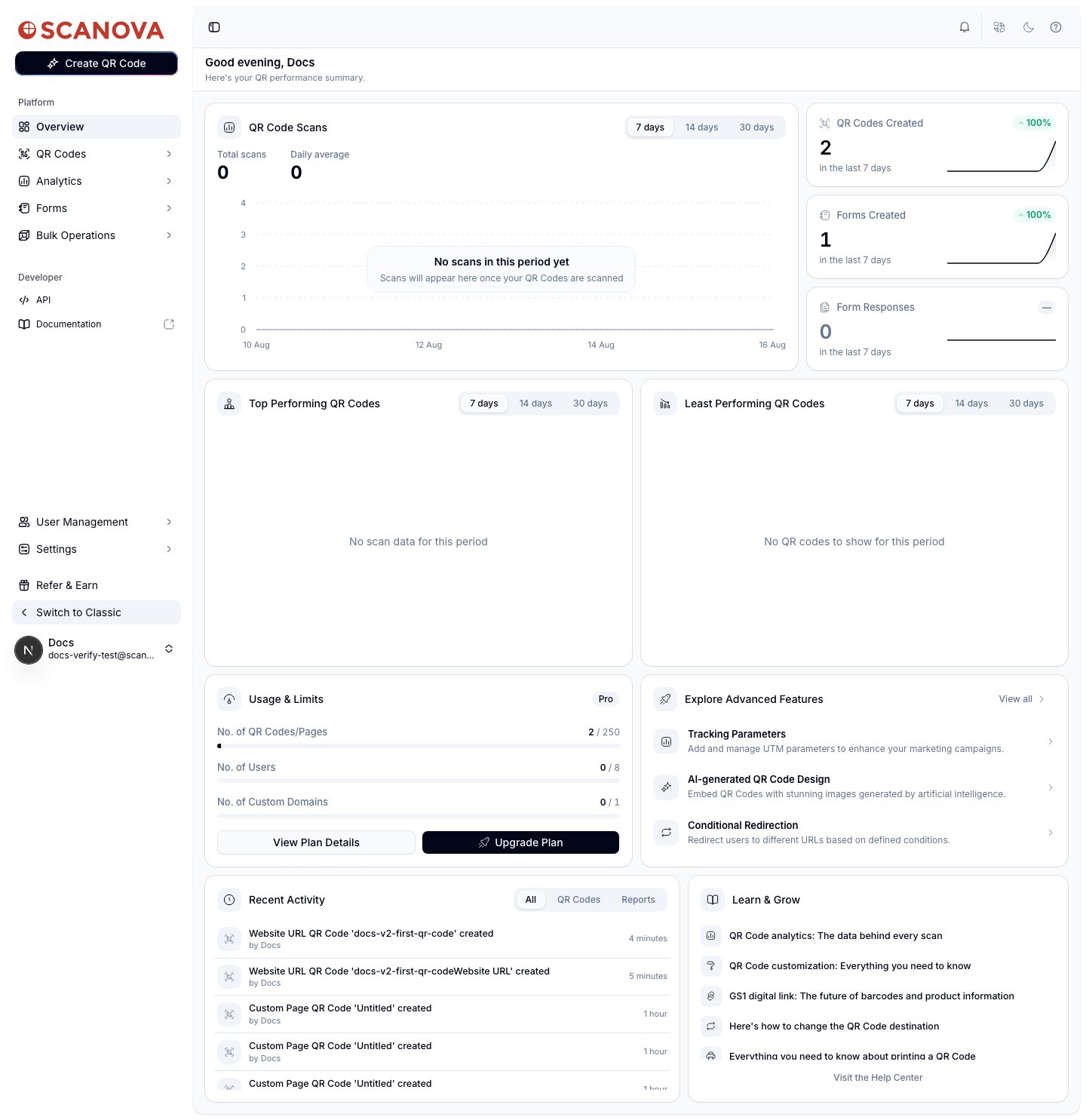
Once logged in, this is what you land on:
 ## Who it's for
Scanova's own login page describes it as "the QR Code platform trusted by enterprise teams to power campaigns, packaging and payments — with analytics built in," and lists logos including Walmart, Cisco, Nestlé, Toyota, AT\&T, and PepsiCo. In practice the app serves both self-serve users on a Pro plan and larger organizations that need multiple team members, custom domains, and API access — the same dashboard and QR-creation flow is used at every plan tier, with higher tiers unlocking features like AI Studio, additional custom domains, and more team seats.
## The main sections
The dashboard's left sidebar is grouped into **Platform** and **Developer**:
* **Overview** — the landing dashboard shown above: scan trends, top/least performing QR codes, usage against your plan's limits, recent activity, and "Learn & Grow" links to help articles.
* **QR Codes** — the list of every QR code you've created (Quick Codes and Pages alike), with search, filters, and a **Trash** for recently deleted codes.
* **Analytics** — scan-level reporting for your QR codes.
* **Forms** — standalone forms you can build and link to QR codes, separate from the page builder's own form blocks, plus a legacy **Lead List** view.
* **Bulk Operations** — batch creation/management workflows.
* **API** and **Documentation** — a link to your API keys/usage and to this documentation site, under the **Developer** group.
Account-level areas — **User Management**, **Settings**, and **Refer & Earn** — sit below the main navigation, alongside a **Switch to Classic** link back to the legacy Angular app.
## Creating your first QR code
To go from zero to a working QR code, see [Creating your first QR code](/getting-started/first-qr-code). If you're integrating against the API instead of the dashboard, QR codes are created via the [Create QR Code](/v1/api-reference/endpoint/qr_manager/create) endpoint.
## Related
* [Creating your first QR code](/getting-started/first-qr-code) — a full walkthrough of publishing your first QR code.
* [Dashboard overview](/getting-started/dashboard-overview) — a closer look at the Overview page and sidebar described above.
* [Quick Code vs. full Page](/qr-codes/create/quick-code-vs-page) — the fundamental choice you make every time you create a QR code.
* [Page Builder overview](/page-builder/overview) — the block-based editor behind every landing-page QR code.
## Who it's for
Scanova's own login page describes it as "the QR Code platform trusted by enterprise teams to power campaigns, packaging and payments — with analytics built in," and lists logos including Walmart, Cisco, Nestlé, Toyota, AT\&T, and PepsiCo. In practice the app serves both self-serve users on a Pro plan and larger organizations that need multiple team members, custom domains, and API access — the same dashboard and QR-creation flow is used at every plan tier, with higher tiers unlocking features like AI Studio, additional custom domains, and more team seats.
## The main sections
The dashboard's left sidebar is grouped into **Platform** and **Developer**:
* **Overview** — the landing dashboard shown above: scan trends, top/least performing QR codes, usage against your plan's limits, recent activity, and "Learn & Grow" links to help articles.
* **QR Codes** — the list of every QR code you've created (Quick Codes and Pages alike), with search, filters, and a **Trash** for recently deleted codes.
* **Analytics** — scan-level reporting for your QR codes.
* **Forms** — standalone forms you can build and link to QR codes, separate from the page builder's own form blocks, plus a legacy **Lead List** view.
* **Bulk Operations** — batch creation/management workflows.
* **API** and **Documentation** — a link to your API keys/usage and to this documentation site, under the **Developer** group.
Account-level areas — **User Management**, **Settings**, and **Refer & Earn** — sit below the main navigation, alongside a **Switch to Classic** link back to the legacy Angular app.
## Creating your first QR code
To go from zero to a working QR code, see [Creating your first QR code](/getting-started/first-qr-code). If you're integrating against the API instead of the dashboard, QR codes are created via the [Create QR Code](/v1/api-reference/endpoint/qr_manager/create) endpoint.
## Related
* [Creating your first QR code](/getting-started/first-qr-code) — a full walkthrough of publishing your first QR code.
* [Dashboard overview](/getting-started/dashboard-overview) — a closer look at the Overview page and sidebar described above.
* [Quick Code vs. full Page](/qr-codes/create/quick-code-vs-page) — the fundamental choice you make every time you create a QR code.
* [Page Builder overview](/page-builder/overview) — the block-based editor behind every landing-page QR code.