> ## Documentation Index
> Fetch the complete documentation index at: https://docs.scanova.io/llms.txt
> Use this file to discover all available pages before exploring further.
# Notifications
> The in-app notification inbox at /notifications, and how it differs from the bell icon in the top bar.
Scanova has **two separate notification surfaces**, verified live against the running app: the bell icon in the top bar (present on every dashboard page), and a dedicated `/notifications` page. They are not the same system — see [Two notification systems](#two-notification-systems-a-real-discrepancy) below before you go looking for one in the other.
This page documents `/notifications`, the module in scope here — a simple **All / Unread** inbox for account-level events like team invitations, quota warnings, and lead or form-response alerts.
This is not where you control which emails Scanova sends you. For that, see [Email preferences](/account/email-preferences) — a separate, six-category toggle list at `/account/email-preferences`. This page is about in-app messages you read in the dashboard, not your inbox.
## The notifications page
Open `/notifications` directly (there's no sidebar link to it — see the discrepancy note below). The layout is a two-pane inbox:
* **Left pane** — a scrollable list of notifications, each showing a title, a one-line body preview, and a relative timestamp. Unread items carry a filled dot and bold title; read items don't.
* **Right pane** — a detail view for whichever notification you've selected, showing the full title, an absolute timestamp, and the full body text. If the notification carries a deep link, an **Open** button appears in the detail header.
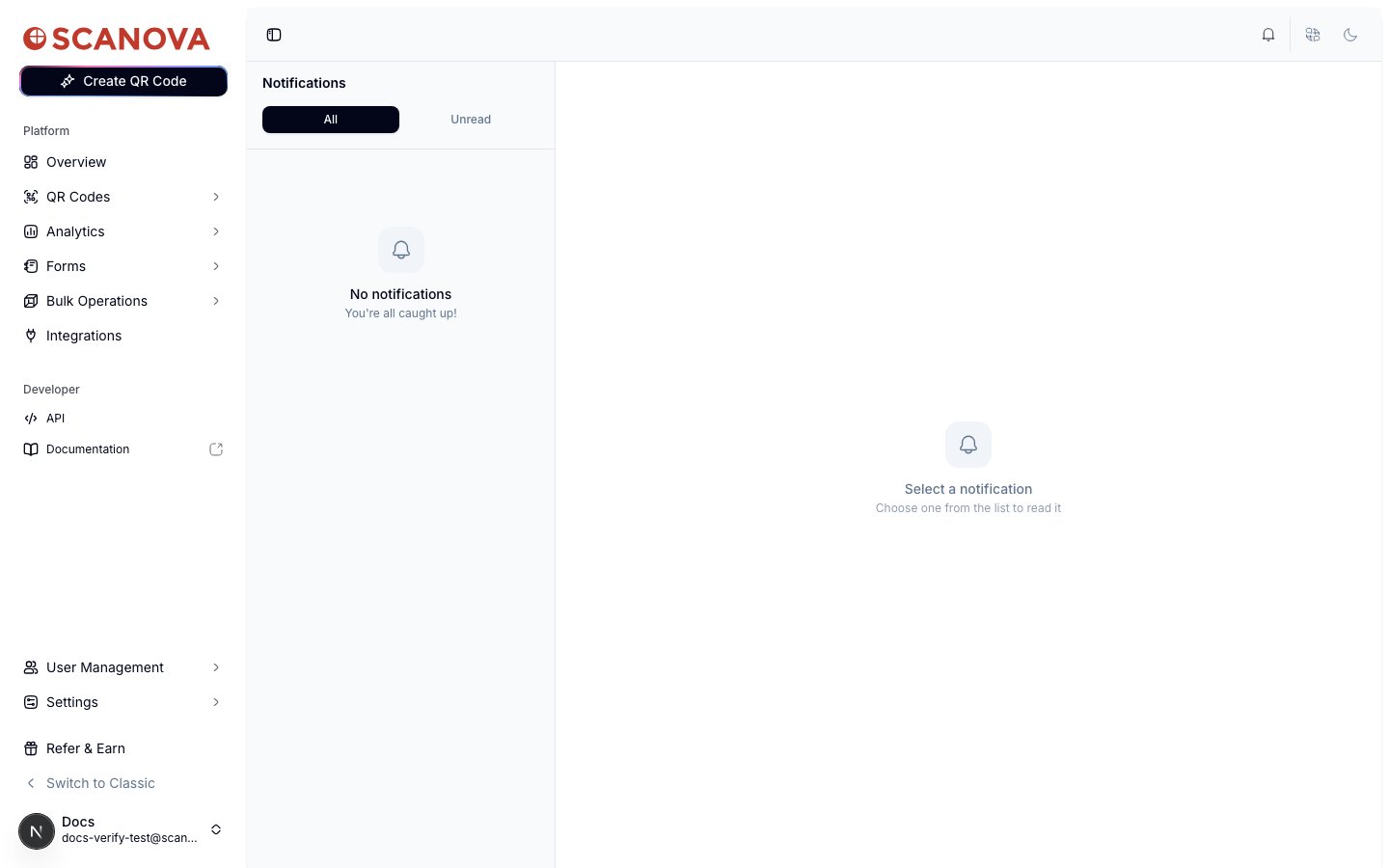 At the top of the list, two tabs filter what's shown:
| Tab | Shows |
| ---------- | ----------------------------------------------------------------------------------------------------------- |
| **All** | Every notification on your account, read or unread. |
| **Unread** | Only unread notifications. The tab label shows a live count, e.g. "Unread (3)", once you have at least one. |
A **Mark all read** button appears next to the tab row whenever you have at least one unread notification, and clears them all in a single click.
Selecting an unread notification from the list marks it read immediately (no separate confirmation) and updates its dot/bold styling in place.
## Notification types
The account used to verify this page had zero notifications, so no live example could be captured. Based on the backend's registered notification workflows (`qcg-backend/src/notification/workflows.py`), four event types are wired to fire a notification:
| Event | Who's notified |
| ------------------------------------------------------------------------------------------------------ | -------------- |
| A shared user accepts your team invitation | Account owner |
| Your account hits a plan quota limit (dynamic QR codes, custom domains, shared users, or AI QR tokens) | Account owner |
| A lead is captured through a lead-generation QR code or form | Account owner |
| Someone submits a form on one of your QR code landing pages | Account owner |
The backend code itself flags these four as "proposed, not confirmed" against the underlying notification-delivery service's dashboard at the time they were wired up — treat this list as the intended set of triggers, not a guarantee that every one of them is live in production today.
## Two notification systems (a real discrepancy)
Live verification found that the bell icon in the top bar — the notification entry point every user actually sees, on every dashboard page — is **a different, separate widget** from the `/notifications` page described above:
At the top of the list, two tabs filter what's shown:
| Tab | Shows |
| ---------- | ----------------------------------------------------------------------------------------------------------- |
| **All** | Every notification on your account, read or unread. |
| **Unread** | Only unread notifications. The tab label shows a live count, e.g. "Unread (3)", once you have at least one. |
A **Mark all read** button appears next to the tab row whenever you have at least one unread notification, and clears them all in a single click.
Selecting an unread notification from the list marks it read immediately (no separate confirmation) and updates its dot/bold styling in place.
## Notification types
The account used to verify this page had zero notifications, so no live example could be captured. Based on the backend's registered notification workflows (`qcg-backend/src/notification/workflows.py`), four event types are wired to fire a notification:
| Event | Who's notified |
| ------------------------------------------------------------------------------------------------------ | -------------- |
| A shared user accepts your team invitation | Account owner |
| Your account hits a plan quota limit (dynamic QR codes, custom domains, shared users, or AI QR tokens) | Account owner |
| A lead is captured through a lead-generation QR code or form | Account owner |
| Someone submits a form on one of your QR code landing pages | Account owner |
The backend code itself flags these four as "proposed, not confirmed" against the underlying notification-delivery service's dashboard at the time they were wired up — treat this list as the intended set of triggers, not a guarantee that every one of them is live in production today.
## Two notification systems (a real discrepancy)
Live verification found that the bell icon in the top bar — the notification entry point every user actually sees, on every dashboard page — is **a different, separate widget** from the `/notifications` page described above:
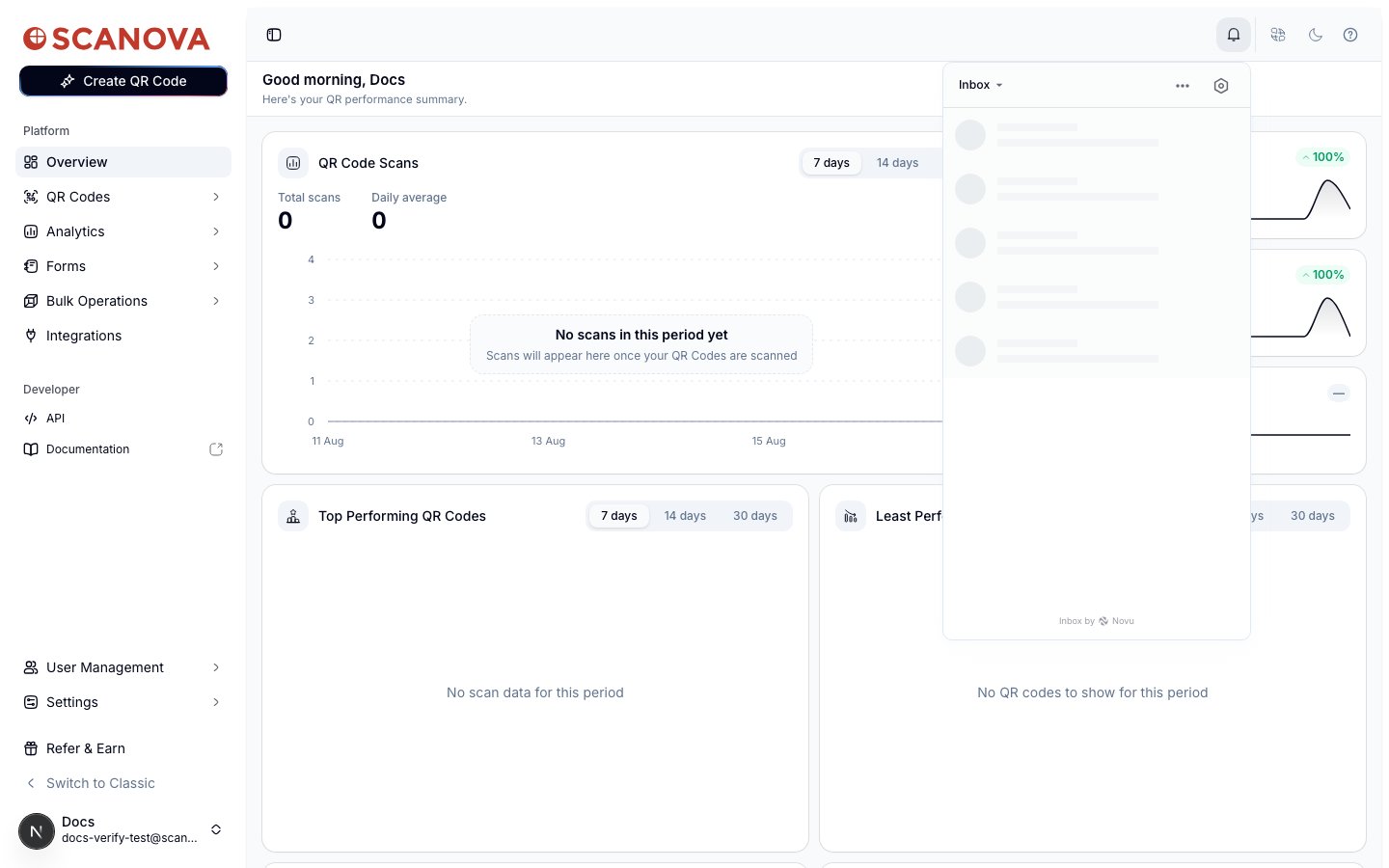 * The bell renders a third-party embedded inbox widget (attributed "Inbox by Novu" in its own footer) with its own read/unread state, its own popover UI, and its own real-time delivery — this is what the four event types in the table above actually feed.
* The `/notifications` page documented above is a **separate, custom-built page** hitting its own backend endpoint, with its own data shape. It is not linked from the sidebar, the top bar, or anywhere else in the app that this verification pass could find — the only way to reach it is by typing the URL directly.
If you're looking for your notifications day-to-day, use the bell icon in the top bar, not `/notifications`. This page is documented as-is because it's a real, reachable route, but it should not be treated as the primary notification surface.
## Related
* [Email preferences](/account/email-preferences) — controlling which emails Scanova sends you, a separate system from both notification surfaces on this page.
* The bell renders a third-party embedded inbox widget (attributed "Inbox by Novu" in its own footer) with its own read/unread state, its own popover UI, and its own real-time delivery — this is what the four event types in the table above actually feed.
* The `/notifications` page documented above is a **separate, custom-built page** hitting its own backend endpoint, with its own data shape. It is not linked from the sidebar, the top bar, or anywhere else in the app that this verification pass could find — the only way to reach it is by typing the URL directly.
If you're looking for your notifications day-to-day, use the bell icon in the top bar, not `/notifications`. This page is documented as-is because it's a real, reachable route, but it should not be treated as the primary notification surface.
## Related
* [Email preferences](/account/email-preferences) — controlling which emails Scanova sends you, a separate system from both notification surfaces on this page.