> ## Documentation Index
> Fetch the complete documentation index at: https://docs.scanova.io/llms.txt
> Use this file to discover all available pages before exploring further.
# Support
> The Support Center at /support — FAQ search, live chat, WhatsApp, phone support, and more.
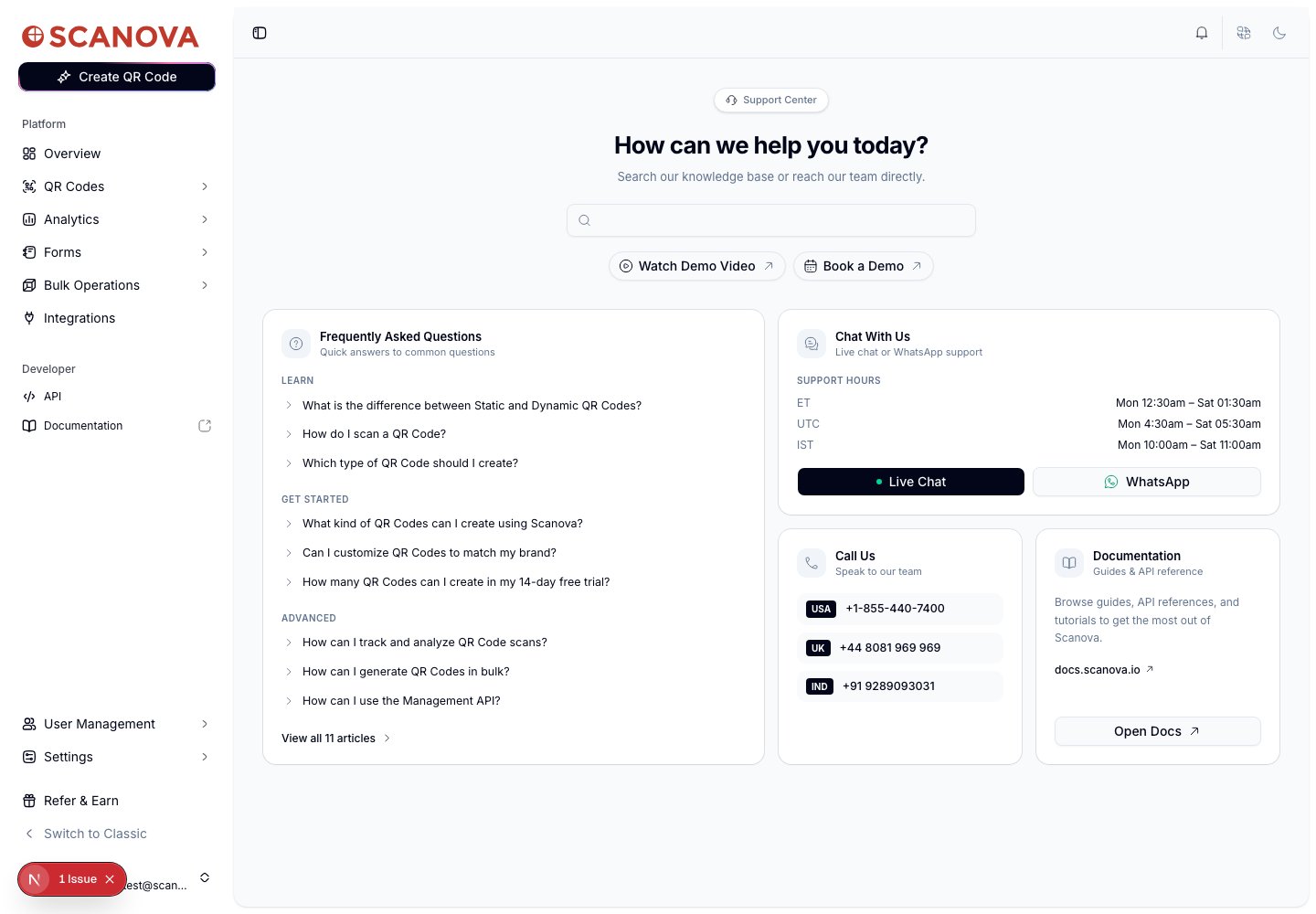
The **Support Center** (`/support`) is Scanova's in-app help hub — a single page combining FAQ search, live chat, phone numbers, a demo video, and a link out to the full documentation and knowledge base.
 ## Searching the knowledge base
The search bar at the top queries Scanova's knowledge base directly (support.scanova.io) as you type, with a short debounce. Results appear in a dropdown below the search bar; selecting one opens the full article in a side drawer without leaving the page.
## Frequently Asked Questions
The FAQ card shows three questions each from three categories — **Learn**, **Get Started**, and **Advanced** — as a live-verified quick-reference set:
| Category | Sample questions shown |
| --------------- | --------------------------------------------------------------------------------------------------- |
| **Learn** | Difference between Static and Dynamic QR codes, how to scan a QR code, which QR code type to create |
| **Get Started** | What you can create with Scanova, brand customization, free-trial QR code limits |
| **Advanced** | Tracking and analytics, bulk generation, using the Management API |
Selecting any question opens its full answer in the same side drawer used for search results. **View all \{N} articles** at the bottom of the card links out to the full FAQ index on `support.scanova.io`.
## Chat With Us
This card lists support hours in three time zones and two ways to reach a live person:
| Time zone | Hours |
| --------- | ------------------------- |
| ET | Mon 12:30am – Sat 01:30am |
| UTC | Mon 4:30am – Sat 05:30am |
| IST | Mon 10:00am – Sat 11:00am |
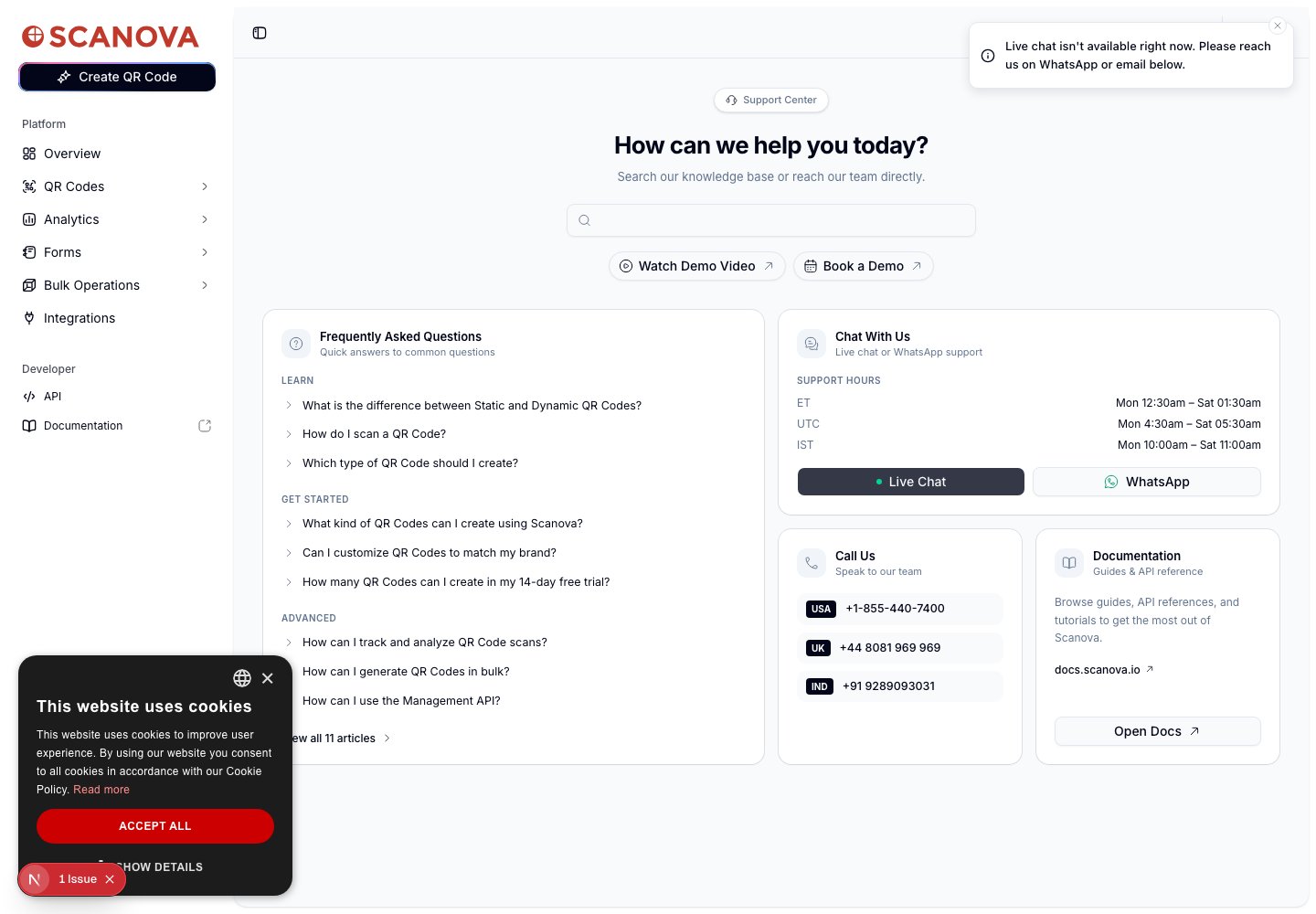
* **Live Chat** opens an embedded chat widget. In this verification pass the widget script wasn't loaded in the dev environment, so the button instead surfaced a toast: *"Live chat isn't available right now. Please reach us on WhatsApp or email below."* — confirming the app has a fallback for when the chat widget fails to load, rather than a silent dead click.
* **WhatsApp** opens `wa.me` with a phone number chosen automatically based on the current time in India Standard Time — a different WhatsApp line covers each of three IST shift windows.
## Searching the knowledge base
The search bar at the top queries Scanova's knowledge base directly (support.scanova.io) as you type, with a short debounce. Results appear in a dropdown below the search bar; selecting one opens the full article in a side drawer without leaving the page.
## Frequently Asked Questions
The FAQ card shows three questions each from three categories — **Learn**, **Get Started**, and **Advanced** — as a live-verified quick-reference set:
| Category | Sample questions shown |
| --------------- | --------------------------------------------------------------------------------------------------- |
| **Learn** | Difference between Static and Dynamic QR codes, how to scan a QR code, which QR code type to create |
| **Get Started** | What you can create with Scanova, brand customization, free-trial QR code limits |
| **Advanced** | Tracking and analytics, bulk generation, using the Management API |
Selecting any question opens its full answer in the same side drawer used for search results. **View all \{N} articles** at the bottom of the card links out to the full FAQ index on `support.scanova.io`.
## Chat With Us
This card lists support hours in three time zones and two ways to reach a live person:
| Time zone | Hours |
| --------- | ------------------------- |
| ET | Mon 12:30am – Sat 01:30am |
| UTC | Mon 4:30am – Sat 05:30am |
| IST | Mon 10:00am – Sat 11:00am |
* **Live Chat** opens an embedded chat widget. In this verification pass the widget script wasn't loaded in the dev environment, so the button instead surfaced a toast: *"Live chat isn't available right now. Please reach us on WhatsApp or email below."* — confirming the app has a fallback for when the chat widget fails to load, rather than a silent dead click.
* **WhatsApp** opens `wa.me` with a phone number chosen automatically based on the current time in India Standard Time — a different WhatsApp line covers each of three IST shift windows.
 ## Call Us
Three phone numbers, one per region:
| Region | Number |
| ------ | ---------------- |
| USA | +1-855-440-7400 |
| UK | +44 8081 969 969 |
| IND | +91 9289093031 |
Each number is a `tel:` link — selecting it on a phone or a device with calling capability dials it directly.
## Documentation
Links out to `docs.scanova.io` — the same documentation site this page belongs to.
## Other quick actions
* **Watch Demo Video** — opens a YouTube walkthrough in a new tab.
* **Book a Demo** — opens Scanova's Cal.com scheduling link in a new tab.
## Related
* [Multi-factor authentication](/authentication/multi-factor-authentication) — if you're locked out of your account rather than looking for product help, start there before contacting support.
* [Troubleshooting](/resources/troubleshooting) and [FAQ](/resources/faq) — curated answers to issues found during this documentation project, distinct from the in-app FAQ search above.
## Call Us
Three phone numbers, one per region:
| Region | Number |
| ------ | ---------------- |
| USA | +1-855-440-7400 |
| UK | +44 8081 969 969 |
| IND | +91 9289093031 |
Each number is a `tel:` link — selecting it on a phone or a device with calling capability dials it directly.
## Documentation
Links out to `docs.scanova.io` — the same documentation site this page belongs to.
## Other quick actions
* **Watch Demo Video** — opens a YouTube walkthrough in a new tab.
* **Book a Demo** — opens Scanova's Cal.com scheduling link in a new tab.
## Related
* [Multi-factor authentication](/authentication/multi-factor-authentication) — if you're locked out of your account rather than looking for product help, start there before contacting support.
* [Troubleshooting](/resources/troubleshooting) and [FAQ](/resources/faq) — curated answers to issues found during this documentation project, distinct from the in-app FAQ search above.