

What the details page shows
Clicking any QR Code — from the QR Codes list, a folder, or a search result — opens its details page at/qr/<qrid>, organized into three tabs: Overview, Data Collected, and Settings.
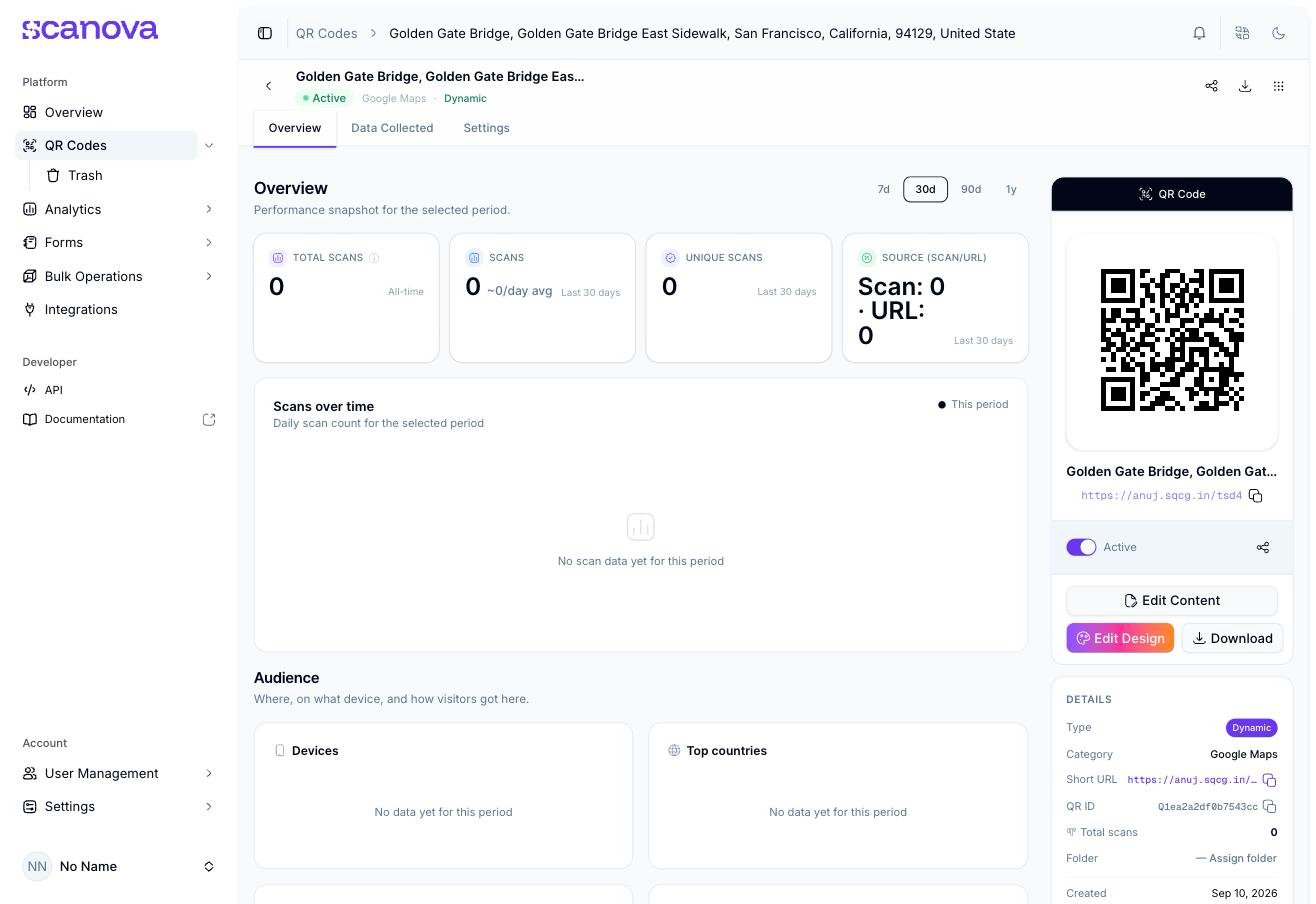
The Overview tab for a freshly published QR Code with no scans yet
Overview
Performance for the selected period (7d, 30d, 90d, or 1y): Total Scans (all-time), Scans, Unique Scans, and Source (Scan/URL) — followed by a Scans over time chart and an Audience section (Devices, Top countries). Every metric and chart shows an explicit empty state (“No scan data for this period,” “No data yet for this period”) rather than a blank space when a QR Code hasn’t been scanned yet.Data Collected
Submissions from the QR Code’s landing page, if it has a form attached. With none connected, the tab shows “No form connected” and a Connect Form button — see Building a form.Settings
Every per-QR toggle — password protection, age restriction, geo-fencing, scheduling, and more — grouped under Security & Access, Tracking & Analytics, and Targeting & Lifecycle.The QR Code panel
Alongside the tabs, a persistent panel shows the QR Code image, name, short URL, an Active toggle (pause/resume the QR Code without deleting it), and three actions: Edit Content, Edit Design, and Download. Below that, a Details block lists Type (Dynamic/Static), Category, Short URL, QR ID, Total scans, Folder, and Created date.Row-level actions
The ⋮ menu next to the panel (also present in the QR Codes list) offers Duplicate and Move to Trash — see Duplicating a QR Code. The share icon opens the same share options as the panel’s own share button, and the download icon opens the Download panel directly, without needing to click into Edit Content first.Related
- Duplicating a QR Code — reachable from this page’s overflow menu
- Downloading a QR Code — the panel’s Download button and the row-level download icon both open this
- Exporting QR Code data — pull the Overview tab’s underlying scan data as a file
- QR Health Center — a cross-account view of the same kind of issues this page’s Settings tab controls